I found myself with a rare 30mins this evening to twiddle my thumbs (between making pasta bake for the family and time to be reading bedtime stories), and attempted to tick a random task off my to-do list. As you may have guessed from the title, feeding activity from a Cowrie SSH honeypot into Slack.
Warnings first; whilst you can achieve the same end-goal, my experience suggests you may also come to regret it – consider yourselves warned….
Protip: just because you CAN hook a honeypot up on a 0.0.0.0/0 and feed it's activity logs to a Slack channel, doesn't mean it's a good idea…#MakeTheBeepingStop beep beep beep beep beep beep beep beep beep beep beep beep beep beep beep beep beep beep beep beep beep beep beep b
@infosanity regrets everything we’re about to discuss….
Still here? Don’t say I didn’t warn you…
Components
As you might have guessed, we need: * Cowrie Honeypot * Slack Channel * Slack Bot * Not enough sense to heed my warning above…
Slack Channel
I’ll assume you already have a Slack Workspace in mind for the integration, setting this up is outside the scope of this write-up, I’ll leave that as an exercise for the reader. Once you’re ready choose an existing channel, or (preferably) create a dedicated channel.
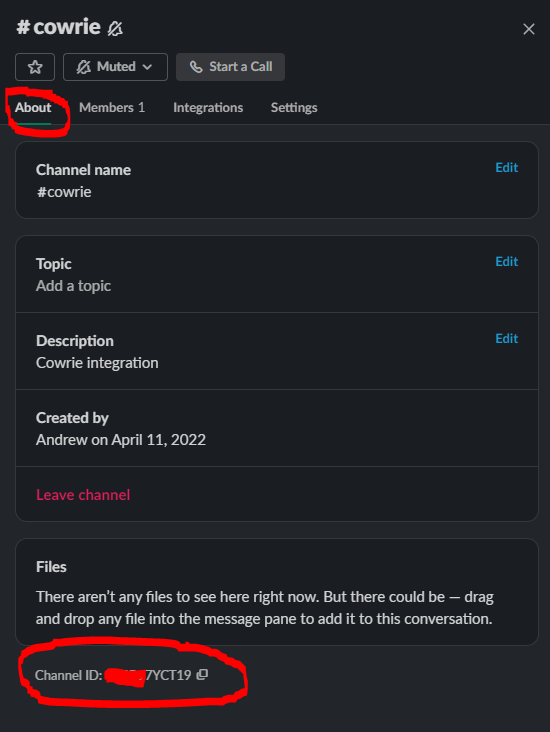
With that selected, make a note of the Channel ID from the About tab on settings:
Slack Channel About settings, gathering Channel ID
Slack Bot
Next up, we need a Bot for integration. I’m far from a Slack specialists, so I’ll admit to get started I simply typed botinto the menu bar, and chose the helpful looking “Create a bot for your workspace” feature shown below.
From here I needed to set two components:
Slack Bot – OAuth Permissions
Admittedly this took me some trial and error, the Cowrie documentation for this feature isn’t the most verbose (or I failed to locate between oven alarms to deal with the next step for pasta bake); but eventually providing the permission of chat:write.public got the integration working.
Slack Bot – OAuth Token
Once permissions are set, and from the same page, finally install the token to your workspace and accept the integration when prompted; copying the resultant Token ID for the final step.
Cowrie Honeypot
If you’re this far, I’m going to assume you already have a functional Cowrie installation. If not, I can help with either a quick and dirty build script or a more mature (but still WIP) Terraform IaC deployment. Once running the configuration settings are in the main {cowrie-install-path}/etc/cowrie.cfg file, something like the below.
And with that, a quick bin/cowrie stop & bin/cowrie start to reload, and you should be good.
But remember, just because you can do something, doesn’t mean it’s necessarily a good idea. Even Slack itself get’s sick of the notifications in short order. I take no responsibility for wearing out either your speakers or your sanity, ‘ere be digital dragons…..
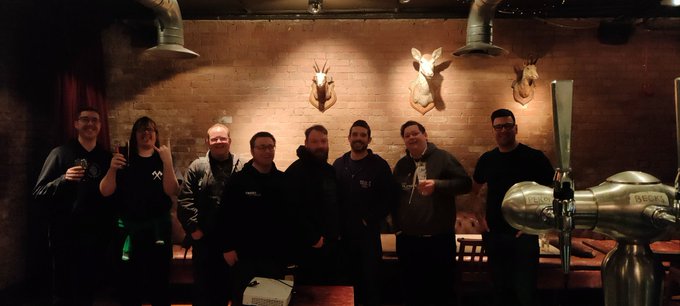
As the world (or at least, myself) begins to emerge from Lockdown, in-person events are returning. For me, this was initiated with an excellent trip to Manchester, experiencing Matillion’s Super All Hands gathering, meeting with new colleagues that had until that point merely been faces on a collage of Zoom tiles. As part of the event, I found myself back on stage, discussing security topics once more and celebrating that on LinkedIn. This post was spotted by an eagle-eyed Ben, which resulted in a conversation that started with “So, Andrew, I see you’re back to presenting in person….” – And that is the story behind how I found myself giving the first ever (in-person) talk at DC44191, located in The Wall’s Secret Cinema Room
Venue: The Wall’s Secret Cinema room
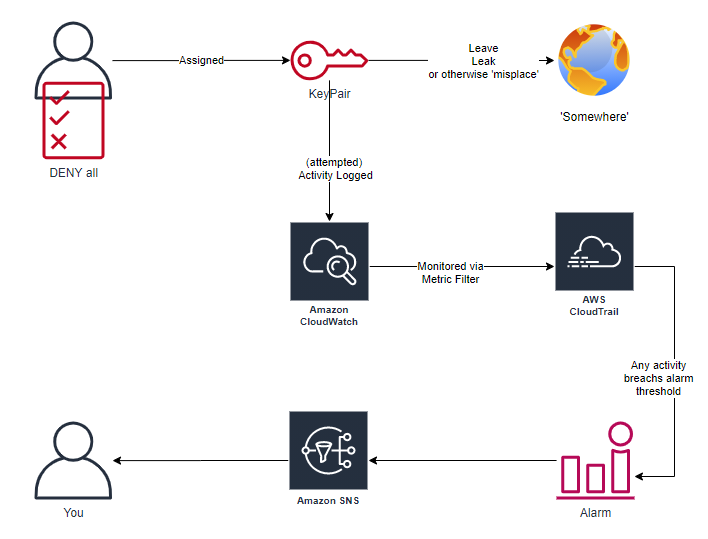
I can take no credit for deliberately continuing the series; but by chance, the topic on my mind flowed on from my first (albeit, virtual) appearance on the DC44191 stage with the first AWS Security Ramblings. Where the first talk had me optimistically providing advice, guidance and experience to those that may be securing an AWS environment for the first; this session went a bit darker. Focused around a fictional (yes, honestly; not sure why no one believes that) scenario of what can happen when things go wrong, access keys fall into the wrong hands, and various nefarious escapades ensue. Topped off neatly with a foray into deploying honey key pairs to watch for adversaries taking advantage.
As promised on the evening, slidedeck for reference can be found below.
Once I was done and off stage, it was time to relax; buffet was served (including a Ceasar Salad, which is a little weird for feeding an event full of hungry security geeks), and I was able to enjoy the second talk of the evening presented by ever excellent Callum Lake, sharing his experience migrating from student to fully fledged infosec professional – providing advice to fellow students for avoiding potential pitfalls; and crucially for me, thoughts on on the seasoned (old?) professionals amongst us can best aid and mentor the incoming generations. It’s a talk that really gave me a lot to think about.
I’ve got to say a big thanks to organiser’s Ben, Morgan and Ryan, fellow presenter Callum, (unnamed) colleague along for moral support, every other attendee, and those that were following along remote on the live stream. Getting back to in-person events was a blast, I’m looking forward to the next event (unfortunately scheduled to be virtual only) with Ben promising to get back on stage himself to cover Azure Sentinel, and I’ll definitely be doing my best to be available for the next in-person session. If you’d like to join us, keep an eye on DC44191‘s Twitter Feed, and please say hi in person.
For some time I’ve come to rely on AWS’s Session Manager for remote administration of my EC2 instances. The ability to drop into a admin shell with nothing other than a browser is too handy to pass up. Especially when you can begin removing ingress points which can be abused, reducing attack surface is always a laudable goal.
But a recent project hit a use-case I’d not encountered. A truly private subnet, not just no ingress allowed via Security Group, not just a private IP address via NAT gateway; a subnet with no Internet connectivity.
Should still work…
Admittedly, my first instinct was this should still work. I was still connecting to AWS via the web browser, and the instance was still within AWS’s infrastructure. Set everything up as normal, yet no remote connection. Investigation ensured and eventually (with some assistance) came across the explanation – Instances require access to various AWS services, which were unavailable in the configuration described above, and those requirements can be plumbed directly into an otherwise private subnet via VPC EndPoints
To Terraform!
A couple of hours trial and error later, and a working demo environment deployed with Terraform was surprisingly easy.
Basic requirements are:
EC2 instance with Session Manager agent installed and active –
Amazon2 OS have agent pre-installed
IAM instance role with permissions to access ec2Messages, SSM and SSMMessages APIs
Native IAM Policy AmazonSSMManagedInstanceCore works nicely
If you’d like to play along yourself, my demo deployment is available here, albeit with a caveat…
Deploying the project will incur (minimal) costs, and it was developed rapidly from the sofa, in a single evening, specifically as a quick proof of concept; it works, but I’d definitely recommend further review before deploying into a production environment, do so at your own risk.
Unless you’ve been living under a rock for the last few years, you’ll know a few things about the Cloud:
Functionality and capabilities released by Cloud vendors are expanding at an exponential rate.
DevOps paradigm is (seemingly) here to stay – the several cold days of building physical hardware sat on the floor of a datacentre where I started my career are a rarity.
Infrastructure as Code makes it ridiculously easy to quickly deploy a vast inventory of resources
All of the above are excellent, and each re:invent, ignite, etc get me as excited as my little kids in the run-up to Christmas, just thinking about all those potentially new goodies to play with. But even as an overly excited security monkey, keeping track of ALL that functionality is near impossible, and ensuring that you don’t introduce a weakness into your environment when leveraging the latest and greatest tech is fraught with danger.
There are many platforms to help identify configuration weaknesses; within AWS I’ve been a great fan of SecurityHub since it’s announcement in 2018, especially after the release of the Foundational Security Best Practice standard earlier this year – but as useful as SecHub is, it’s a bit stable-door-y, in that it’s identifying issues after they’re in your environment. What if there was a better way?….
TFSec
With the advent of Infrastructure as Code (IaC) referenced above, I’ve been building a lot of cloud architecture as code; and the environment’s I’ve been working within have tended to leverage Terraform’s platform for this purpose. TFSec is a tool to identify potential security issues with a projects plans/designs before you commit to deploying the resources into your production environment. And taken a step further, tfsec’s design can be leveraged to implement into your existing CI/CD pipeline (either passive or blocking), allowing common security issues to be identified automatically during the standard deployment process, without needing any specific input from the security team.
Sound good? Let’s take a closer look….
Install
I’ll not steal any thunder from the tfsec documentation, but I found installation surprisingly straightforward, a one-liner with your favourite package manager was all it took to get the binary on my system
choco install tfsec
Running
Running the tool is equally straightforward from your local system. Simply navigate to the directory containing the project you have concerns about, and:
tfsec
Yes, it really is that straightforward.
Example/demo time…
Using the AWS Access Key Honeypot hobby project I’ve been working on recently as an example, tfsec ran a quick audit and identified that the SNS Topic used for notifications, whilst working perfectly for happy-path use-case, wasn’t encrypting it’s messages in transit.
A feature that I found really helpful when starting to work with tfsec, is that it maintains specific documentation for each configuration issue it checks against, including an explanation for why the finding is a problem, as well as a reference example of what a secure/resolved configuration looks like. In the case of the above, all details can be found at: https://www.tfsec.dev/docs/aws/AWS016/
In my case, the message content expected via the SNS Topic isn’t overly sensitive; and key management configuration is outside the scope of a demo project designed as a starting point for people to implement the same in their own environments (as all KMS key configurations, policies etc. could be different) – I may deal with this issue later, but for now I was happy with the single finding; but how to inform tfsec of this acceptance?
All findings/checks can be ignored within your code base, sticking with the above example, I added the below line to the SNS Topic’s resource block. Both telling tfsec to ignore the finding on output, and providing documentation of said decision, all trackable in source control as standard.
#tfsec:ignore:AWS016 - SNS topic encryption beyond scope of demo deployment
And with that, analysis of the updated project returns clean:
code\Access-Key-Pot>tfsec

  disk i/o             9.4636ms
  parsing HCL          0s
  evaluating values    500.5µs
  running checks       499.1µs
  files loaded         4

No problems detected!
Additional integrations
Whilst the above use case of manually checking your projects has a lot of merit, I believe the true potential value of tfsec (and similar tooling) comes from integration with the automated deployment pipelines leveraged by modern dev teams. Triggering a security audit of planned infrastructure on every change, and feeding the findings back into the project’s issues via (for example) Github Actions should make continuous security auditing painless, seamless, and all within platforms already familiar to your dev and infrastructure colleagues. Example (‘borrowed’ from tfsec’s documenation) below.
Cloud Agnostic
The other advantage tfsec provides over my previous example of AWS Security hub (or Azure’s Sentinel); is it’s ability to identify security issues across multiple IaaS vendors, currently covering the big 3 of AWS, Azure and GCP. If you’re concerned of being tied to one vendor, tfsec can help keep your toolset and skills transferable if (when?) your business unit changes direction to a different vendor, your change employer entirely, or simply find that ShadowIT platform that Bob from finance spun up on the weekend that needs an emergency review and lockdown.
Summary
So, go ahead, add tfsec into your deployment pipelines, throw the binary locally at the project you’re currently working on (or that ‘legacy’ platform that Sharon built years ago, and no one has had the confidence (/naivety?) to touch since she left….
Deception technology and techniques are having a resurgence, expanding beyond the ‘traditional’ high/low- interaction honeypots, into honeyfiles, honeytokens and (as you may have guessed from title) honeyusers. Today is the culmination of a “what if?” idea I’d been thinking for years, actually started working on earlier in the year (but then 2020 happened), but is now released. For those that want to skip ahead, GitHub repo here.
As name suggests project deploys dummy users into an AWS account, which can then be lost, embedded or leaked in places an adversary may come across them. Created users have (*almost) no permissions to do anything, but that attempted activity can be monitored and alerted on, giving 100% true positive threat intel of unauthorised activity within your environment.
(*almost no permissions: Given AWS API model, STS call get-caller-identity will succeed; but this is a read only function providing metadata of the honeyuser itself. N.B. if any cloud red-teamers are aware of an exploit that can chain from just the information leaked from this call, I’d love to know more)
Full information available in the projects ReadMe, but high-level architecture of the components deployed by Terraform:
Summary Architecture
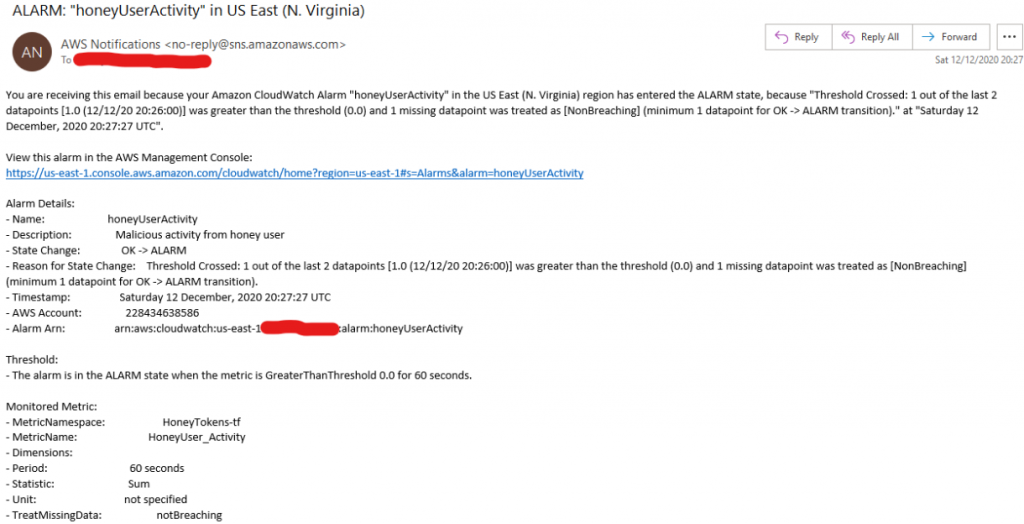
Once created, any from the dummy user will trigger a notification, which can be consumed by whatever alert/monitoring/threatIntel platform you’re leveraging (or just a simple email)
Example notification
If you don’t want to run some infrastructure as code scripts from a random InfoSecMonkey on the Internet (I won’t hold it against you). Take a look at Thinkst’ Canary project, where you can implement similar tokens (and MANY more, seriously, Thinkst deserve massive props, or at least a follow) without needing to get your hands dirty directly, and via a nice webUI.
Finally, I’ll end with a request: I’d love to end with a request: If you’re sprinkling deception users across your estate with this project (or any other method), I’d love to hear some war-stories if they’re not locked behind NDAs.
You know the old adage of “a bad workman blames their tools”? Well, guilty as charged…
When I built my AWS-cardspotter project with Terraform, the main goal was to learn Terraform, which I had no/limited/not-enough experience with at the time. Looking back at that initial deployment (it’s awful, please don’t judge me, or use as a reference point for anything in production workloads…), one of the criticisms I’d laid against Terraform was the need for a separate built step, bundling the Lambda’s code to a zip archive prior to being deployed with Terraform. As you might have guessed from the title and opening of this post, I was wrong.
Introducing the all powerful (well, useful) archive_file data block:
data "archive_file" "spotter_lambda_archive" {
  type        = "zip"
  source_dir = "../AWS-card-spotter/Lambda/"
  output_path = "AWS-card-spotter_LAMBDA.zip"
}
Oooof! That’s a long title, but I realised after last post (did you miss last episode? catchup here) that whilst the post covered all the technical requirements for getting aws-vault operational, it missed some steps to truly integrate with your current workflows, without introducing additional cycle. So without additional pre-amble, introducing……
credential_process=….
As it’s name may imply, the credential_process directive is added to the standard .aws/credentials file to tell AWS clients/SDKs how to generate the requested credentials on the fly rather than hardcoding key-pairs into the .aws/credentials file (remember: hardcoded, clear-test credentials ==BAD).
What does this look like in practice? If you’ve been following along, you’ll have seen that I have a demo environment with a profile infosanity–demo, and that to access the temporal credentials generated by aws-vault, I’d shown passing the command I wanted to run as a given user/role to the aws-vault binary. Like so:
>aws-vault exec infosanity-demo aws sts get-caller-identity
Enter token for arn:aws:iam::<redacted>:mfa/infosanity_demo: 858178
{
    "UserId": "AIDA<redacted>",
    "Account": "<redacted>",
    "Arn": "arn:aws:iam::<redacted>:user/infosanity_demo"
}
This works, but I promised integration with your existing, non-aws-vault-aware workloads; you don’t really want the extra finger workouts for typing aws-vault exec $profile in front of every command requiring AWS credentials. [Profile] blocks are common components of the .aws/credentials file, and if you’ve already got hardcoded key pairs, this is where you’d find them with aws_secret_access-key config lines. If you’ve confirmed that aws-vault is configured and working (the above sts get-caller-identity call is perfect for testing), then replace your current hardcoded keys with similar to:
It really is that simple. Now, the next time an AWS client/SDK/etc attempts to use your profile, it will trigger aws-vault in the background, providing the particular script/runtime/etc. with temporary keys, without the tool needing to change for, even be aware of, the integration with aws-vault keeping your actuall AWS key pairs much safer (or non-existent if you’re using role assumption, which I’d recommend).
N.B. this isn’t just for aws-vault, if you manage your AWS secrets via a different method, credential_process will still provide the capabilities described with any utility that is able to provide AWS credentials in the expected format. Truly powerful.
Now, reverting back to the native cli tool works flawlessly….
> aws --profile infosanity-demo sts get-caller-identity
Enter MFA code for arn:aws:iam::<redacted>:mfa/infosanity_demo:
{
    "UserId": "AROA<redacted>:botocore-session-1606155746",
    "Account": "<redacted>",
    "Arn": "arn:aws:sts::<redacted>:assumed-role/infosanity-demo-test-role/botocore-session-1606155746"
}
No more (well, less) excuses for hardcoding AWS keypairs and (potentially) leaving them in backups, git commits, etc. – because that would be embarrassing….
Previously I’ve covered why it’s important to protect AWS Key Pairs, how to enforce MFA to aid that protection, and how to continue working with the key pairs once MFA is required. If you missed the initial article post, all is available here.
Everything in that article works, but as with a lot of security it’s a bit of a trade-off between working securely, and working efficiently. It’s certainly more secure than cleartext keys being the only defense between you and an adversary raiding your cloud environment, but from a dev/ops’ perspective? It’s additional steps before anyone can do anything productive. Who wants a workflow that requires a couple of minutes unproductive work before we can do actual work? How can we improve?
Automate all the things
Once understood; the workflow for generating temporary keys is relatively simple. It just requires a fair amount of copy/pasting, which is tedious for anyone. Surely it can be automated, jumping into my favoured Python, with Boto imported, it can be.
The guts of the requirement is a single get_session_token call to AWS’ Security Token Service (STS), in this case using AWS’ Boto3 library for Python to handle the creation of an API client.
Once we have our temporary credentials, a handful of quick print statements will re-purpose received credentials ready for inclusion into ~/.aws/credentials file:
A fullly working CLI script is available in Gist form here
Enter AWS-Vault
The quick script above serves our needs, and is an improvement over manually setting serial-token ARNs etc. manually everytime we want to do some work. But now we know how to leverage the available SDKs and understand how the underlying process works, lets stop naively assuming we’re inventing the wheel for the first time and review some existing utilities.
AWS-Vault as a project has been around for roughly 5 years, and is still evolving and improving today. Among many other capabilities, it handles the usecase outlined above (without relying on a script, written in an evening), and is cross platform covering Windows, OSX and Linux (although there’s no prepackaged bundle for dpkg based platforms, my ‘nix of choice).
Once installed, aws-vault is aware of your existing .aws/config file, limiting the configuration steps required to get up and running (no need to duplicate serial-token ARNs to conf[] as with my quick scripts). Just be aware, that as aws-vault is .aws/config aware, it will also modify the same config file as needed whilst you interact with the vault; just in case, backups are (as always) recommended.
The first thing you need to do is add base credentials for your source user, in my case:
>aws-vault add infosanity-demo
Enter Access Key ID: AKIAsomekeyhere
Enter Secret Access Key:
Added credentials to profile "infosanity-demo" in vault
Once securely (aws-vault integrates with OS’ native secure key store, such as KeyChain or Windows Credential Manager. No more keys in plaintext files littering your HDD) stored within the utility, you can see the credentials you have available:
And start working with AWS, letting aws-vault handle management of temporary access keys in the background. For example using aws-vault’ exec to wrap your usual command, in this case aws cli client itself to verify our identity, and then confirming aws-vault’s session state.
>aws-vault exec infosanity-demo aws sts get-caller-identity
Enter token for arn:aws:iam::<redacted>:mfa/infosanity_demo: 858178
{
    "UserId": "AIDA<redacted>",
    "Account": "<redacted>",
    "Arn": "arn:aws:iam::<redacted>:user/infosanity_demo"
}

>aws-vault list
Profile                  Credentials              Sessions
=======                  ===========              ========
infosanity-demo          infosanity-demo          sts.GetSessionToken:59m53s
With aws-vault up and running, you’re ready to leverage all the power of aws’ APIs and associated IaC frameworks (such as my favoured CDK). Safe in the knowledge that your access credentials are securely managed in the background, and (hopefully) reducing both the likelihood and impact of access keys accidentally sneaking into a source code commit, or accidental(?) tweet….).
In the last week of August, in the middle of Summer vacation, I had the honour of being asked to give a presentation at the second meeting of the newly formed DC44191 in (virtual, for now) Newcastle. Local DefCon groups are an offshoot of the long running, DefCon conference (usually) hosted in annually in Las Vegas. If you’re not aware of the great history of DefCon, you can get a jumpstart here.
Whilst honoured to be asked, and keen to do anything necessary to support the rise of another local infosec group; I was nervous. DefCon is all about teh hackz, and whilst I’ve spent some time as a roadwarrior-ing red-teamer, that’s not been my day to day activity for the last few years. Would those interested in attending DC groups be as interested in BlueTeam topics? I needn’t have worried, I pitched my idea of “Things I wish I’d known about AWS, when I started working with AWS” to Callum, and the session was greenlit.
The talk is born
Most cloud security discussions, whilst useful, tend to begin from one of three premises:
Building ideal infrastructure on greenfield site, this is what we’re going to build
Pre-built ideal infrastructure, this is how we built it
Or a deep dive into a specific technologies and services, in isolation from the wider picture.
What I wanted to discuss, and hopefully I managed, was what I would do if parachuted into an existing AWS account and was suddenly made responsible for securing whatever is there. Whether starting a new role and needing to get up to speed rapidly, or upon discovery of more of the the ever popular ShadowIT. With that in mind, what was covered in this whirlwind tour of day one(ish) with a new, to your, AWS environment?
Stop using your root account!
Seriously, if you only take one thing from this, STOP USING THE ROOT ACCOUNT, and whilst you keep it nice and idle make sure to delete any access keys and enable MFA for extra protection. You do not want someone unauthorised helpfully spinning up infrastructure on your behalf (and at your expense….).
If you’re using the root AWS account, nothing I’m going to discuss below is as important; stop reading now and go deal with that first. I’ll still be here once you’re done.
Don’t know if the root account is in use or suitably secured? Read on, we’ve some services that might help you later…
Logs! Enable CloudTrail
In the ephemeral Cloud, observability is key. If you can’t see it, you can’t secure it; and CloudTrail is the cornerstone of almost all other key security features below. Turn it on, make sure it can see EVERYTHING (yes, even that region you’ve no intention of ever using). Get it turned on an capturing data you’ll need later.
Automated config control and asset management sound good?
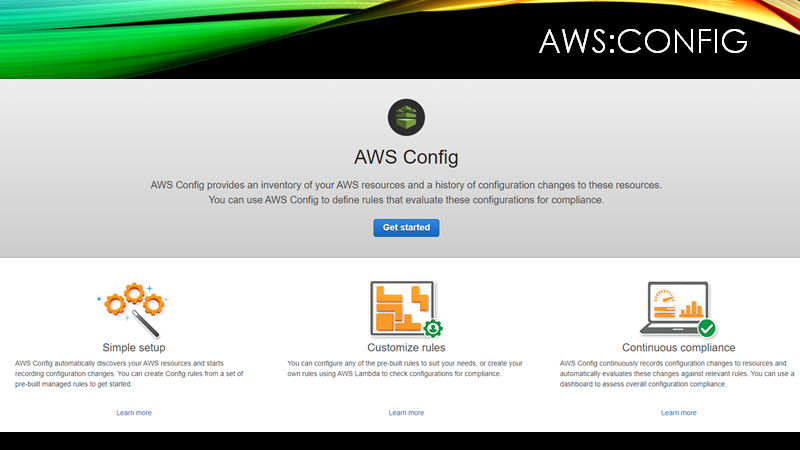
Easily setup with a couple of clicks, Config will begin to track the configuration of your AWS resources (at AWS level, not internal configuration of EC2 server instances etc.). Creating a searchable asset inventory and audit history of configuration changes. Want to know who made the supersecret S3 bucket public 30mins after a security audit checked it was suitable restricted? Config can answer your who did what to what questions.
But wait, there’s more. Take the above example, knowing who did what is good, but that’s horse-bolted-stable-door territory. Wouldn’t it be good if we could have a business rule that states “S3 buckets will not expose data direct to the entire Internet”, and the infrastructure could self enforce? Enter rules and remediation actions. Define the rules, and what actions to take for items that fail. With Lambda routines, ANY (*almost) requirement you have can be automated. But I’m going too far down a rabbithole for this overview, maybe there’s a followup post or three there, for now just know that Config rules can help tell you, for example, if the Root user account has active access keys in use (see, told you above we’d help with that).
In summary AWS:Config verifies sensible configuration from the people with legitimate access to your cloud, and makes proving that with auditors really easy. Change Control Auditing as a Service.
What about attackers?
AWS also has you covered with GuardDuty, essentially an incloud IDS monitoring for all manner nefarious activity. If you are dropped into an existing AWS workload, either review Guardduty logs for an overview of what threats are bombarding the systems; or enable it (it’s quick and relatively inexpensive) and then review the findings for an overview of what threats are bombarding the systems. Its one of those services that you hope never troubles your inbox, or command too much of your time, but you can rest easy(ier) in the knowledge that it’s monitoring for threat activity 24/7 so you don’t have to.
We’re still only in our hypothetical day one of being responsible for a new AWS environment, and we’re already managing a good number of systems. Time to call our favourite reseller for one of those “single pane of glass” platforms? Nope, AWS again has you covered, in this case with SecurityHub. Recently (-ish, 2018) released to combine security findings and metrics from a number of different sources (including those above, funny how that happens) and presents all from one service.
And as an added bonus, if you got a bit overwhelmed by the quantity of potential rules you can employ within AWS:Config (before we even get to custom rules) you can stand on the shoulders of giants (CIS, PCI Council, or AWS themselves) and enable a steadily growing list of security standards, which will enable and report back on a multitude of checks and metrics at the touch of an Enable button. This workload handle payment data and fall underscope for PCI DSS controls? Enable the PCI-DSS standard, and relevant checks will spring to life, helpfully mapped to the specific control requirements for easy auditing purposes.
The End….
With that, my whirlwind tour of where I’d start reviewing and securing an AWS account that I was newly responsible for was over. I’ve not quite put it into practice to see if you could actually achieve all that in day one, but it’s good to have goals. If anyone puts it to the test, I’d be curious to know the outcome when theory meets reality.
Unlike the inaugural DC44191, kicked off by the inimitable Mike Thompson discussing 3rd party web apps, this meeting wasn’t recorded for prosperity; which as I have a face for radio, not live streaming, is probably a good thing. Despite that limitation, I’m since regretting that decision to not record as I’ve had a few questions from people after the event that would have been easier to answer with a recording of the talk to point to. And the session’s Q&A was lively and covered some more advanced topics I’d considered, but left out of the presentation, it would have been good to have those interactions recorded also, especially as some audience members more knowledgeable than I jumped in to expand some answers as well as ask perceptive questions.
If you were in attendance for the live DC44191 presentation, I hope it was worth your time.
Similarly, if you’ve got this far, thank you for reading and I hope it’s sparked some ideas which can help your current and future challenges securing AWS workloads.
If you’ve any questions, or would like to discuss any aspect in more depth; please leave a comment below, or find me on twitter
It’s hard to judge time given current non-technical ongoings, but it’s (about) a year since the “A Northern Geeks trip…..” series stayed close to home. That was the inaugural BSides Newcastle, and somehow it came time for the 2020 edition. Which brought about some changes; firstly, C-19 forced the organising team to abandon some amazing plans as this years event went virtual (trust me, some of the plans would have been amazing; no spoilers as I hope they get resurrected for next year (in the hope we can once again share a meatspace location). Secondly, on a personal level I stepped back from being involved with the organising team this year, the strain of C-19 meant I couldn’t take on any additional demands, instead focusing on young family, paid employment, and mental health. Thankfully, and entirely predictably, my absence had zero negative impact on a great conference, which I was able to selfishly enjoy risk free as a participant.
My first thoughts, Virtual conference still feel weird to me. As I posted at the time, livestreaming a conference to my living room that I’m currently travelling in person for just felt off. I suspect this may be the delivery method for the forseeable future, so I hope I can get used to them quickly.
A negative of being in home mode, rather than conference mode is that my note talking during talks was dire, so I can’t provide my usual long form review of the sessions I attended. But there were a few talks that stood that I’d like to mention:
Sam Hogy‘s talk on Friday covering security CD/CI pipelines was excellent, and definitely had some content that I want to review again later.
Avinash Jain covered a similar topic with discussion of moving security to earlier steps of the DevSevOps pipeline
It’s hard to make topics that include the work compliance interesting, even to those of us that work within the various frameworks. But Bugcat did a great job of walking through methods of leveraging SIEM logs and capabilities to drive and prove PCI-DSS compliance. My only complaint was that the resolution of the demos/screenshares was hard to make out some of the exact content shown.
Looking at the talks that really stood out, I found it interesting that my preference in conference material has shifted along with my professional change from red team to blue over the last few years. Whilst they were good talks, Gabriel Ryan generating obfuscated malware payloads on the fly with the introduction of DropEngine, or Mauro and Luis weaponising USB powerbanks didn’t pique my interest the way similar topics have in previous years.
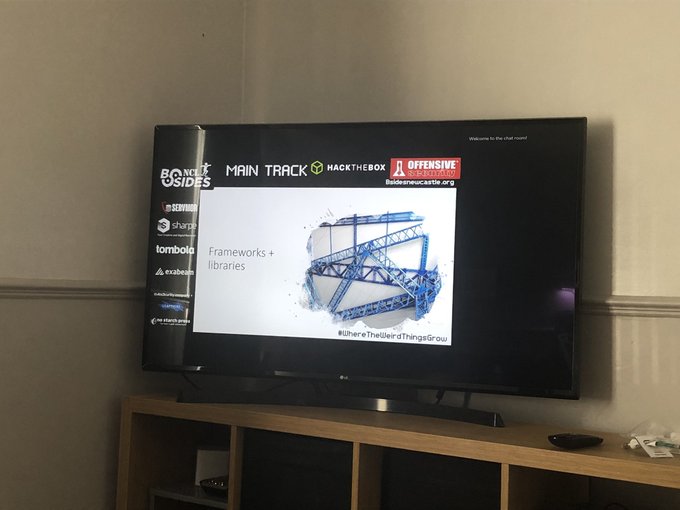
That’s the talks covered, but BSidesNewcastle wouldn’t be living up to it’s tagline of #WhereTheWeirdThingsGrow (emphasis mine) without some weird. Remote nature of this years con meant that we weren’t all huddled in a skate park, or watching a wrestling display whilst enjoying fresh stone baked pizza, but the team did not disappoint on the weird front. From the Antaganostics waving socks containing bricks at swordsmen to settle disputes (don’t ask) to a tin-foil-hat making competition, there was plenty of fun to be had, and memories to be treasured.
So whilst I may personally struggle with the context shift to virtual cons, in a year with physical cons (rightly) cancelled left, right, and center; I’d like to extend my deep appreciation for all of those involved in making the event a great success against all the difficulties this year has presented. This equally goes for the corporate sponsors whom helped provide the resources to make any conference possible, the move away from physical conference must have made sponsorship a risky ROI discussion, I hope the faith in the BSidesNewcastle team and community was well reward (and I’ll try not to take it personally that my own corporate overloads sponsored this year’s event, but was deemed too risky when I was personally involved in running last years proceedings. #itHurts….. 😀 )
Until next year, hopefully we can all safely return to meet, hack and be merry in person.